Subtitles on your device
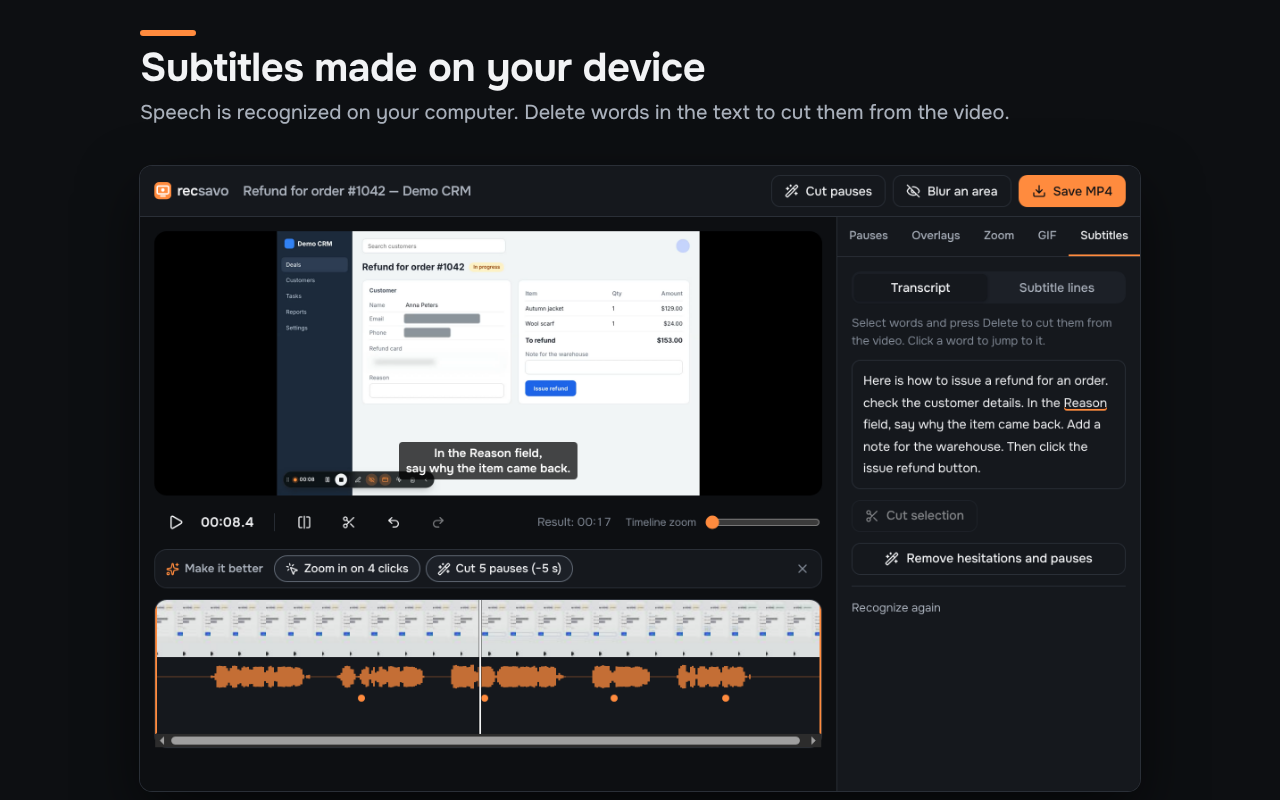
Speech is recognized in the browser, in Russian or English, with the language detected for you. Burn the subtitles into the MP4 or save them as .srt and .vtt; fix any line.
Tab, screen or camera with audio, saved as a regular MP4 on your computer. Subtitles are recognized on your device, the picture zooms in where you click, and pauses and “um”s are cut from the transcript.
Free · no account · Chrome, Edge, Opera, Brave, Vivaldi, Arc, Yandex Browser
Press Record and pick a screen, window or tab. It stops by itself.
The demo stops at 15 seconds. The extension is free with no limits until December 31, 2026, with an editor and a library; from January 1, 2027 free recordings are up to 30 minutes.
What cloud recorders keep for their paid plans, done in your browser, on your computer. Your video and audio are never sent anywhere.
Speech is recognized in the browser, in Russian or English, with the language detected for you. Burn the subtitles into the MP4 or save them as .srt and .vtt; fix any line.
Delete words in the transcript and the video is cut there. Hesitations and long pauses are found for you: untick the ones to keep and cut the rest with one button.
When you record a tab, Recsavo remembers where you clicked and smoothly zooms in on those spots in the finished video. Move, change or remove any zoom.
Add them over the video after recording. They look the same in the MP4 as in the editor.
Honest limits: Russian and English are recognized. The recognition model (about 76 MB) downloads once, after you click “Create subtitles”. Clicks are saved only when you record a tab.
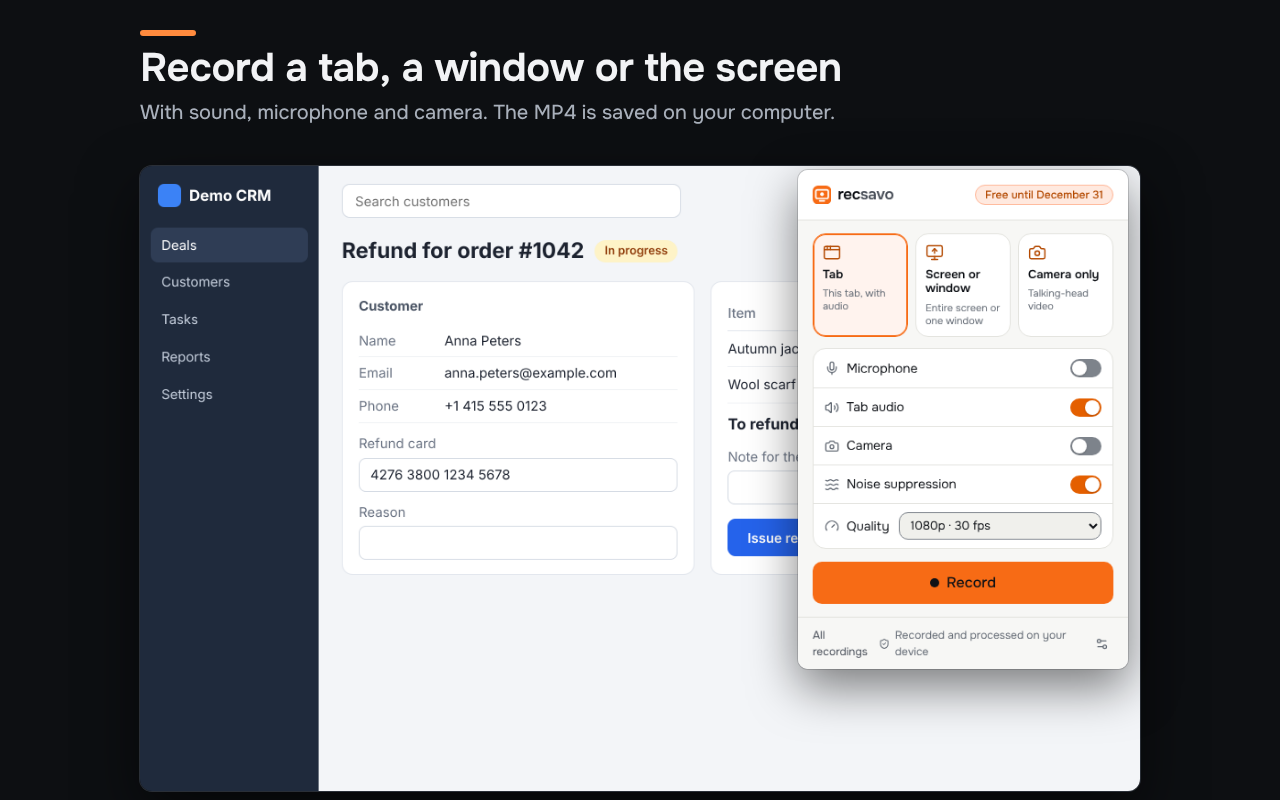
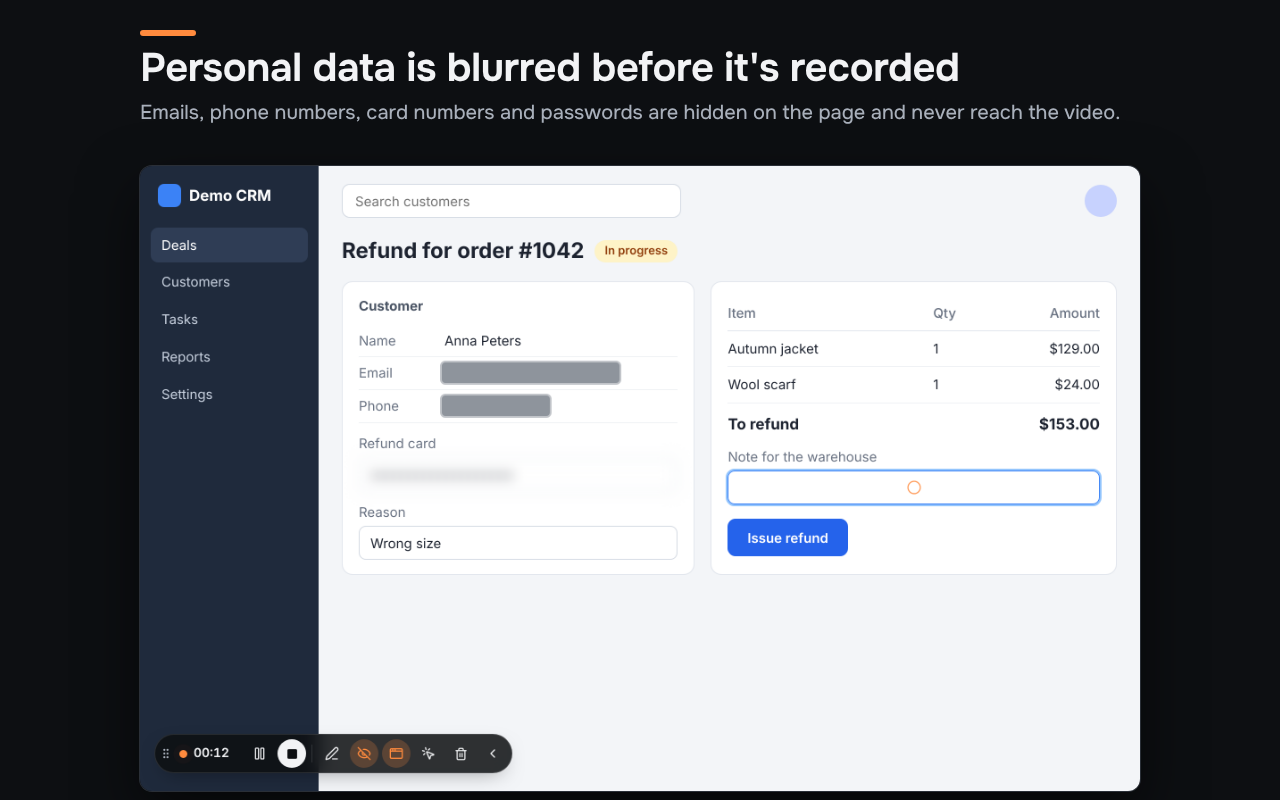
Authentic extension screens: recording, privacy protection and editing.
Recsavo is made for short work videos: show a client a setting, a colleague a procedure, a developer a bug.
A tab with its audio, a window, the whole screen or just your camera. A recording panel with pause, countdown and click highlights.
When you record a tab, emails, phone numbers, card numbers and passwords are blurred while you record. In the editor, hide any area and cut the pauses.
A regular MP4 for an email, ticket or chat. No links into someone else's cloud: the file is yours.
Recsavo listens to the recording and finds where you were silent. Watch the track shrink.
Demo on a prepared track. In the extension, pauses are found in your recording's real audio, and you see each one before saving.
Turn the blur on and see what your recipient will see.
Honest limits: blur works when you record a tab, not a screen or window. Text in images and video isn't detected. Review the recording before you send it, and hide any area in the editor if needed.
Each tool has its own job. Here's what matters for short work videos.
| Recsavo | Loom Business + AI | Screenity Pro | OBS Studio | |
|---|---|---|---|---|
| Price | Free until December 31, 2026 | $24 per user per month | $10 per month | Free |
| Where the file ends up | MP4 on your disk | Loom's cloud, downloadable | Your disk or Screenity's cloud | Your disk |
| Account required | No | Yes | Yes | No |
| Recording length | No limit | No limit | Up to 1 hour | No limit |
| Quality | Up to 4K | Up to 4K in the desktop app, up to 1080p in the Chrome extension | 1080p export | Any |
| Subtitles | Transcribed on your device | Transcribed in the cloud | Transcribed on EU servers | — |
| Subtitle languages | Russian and English | 50+ languages | English only | — |
| Edit by transcript, remove “um”s and pauses | Yes | Yes | — | — |
| Auto-zoom on clicks | Yes | Announced | Yes | — |
| Arrows, boxes, text over the video | Yes | Yes | Yes | In scene settings |
| Emails, phones and cards blurred automatically | Yes, when recording a tab | Manual areas only | Manually | Via filters |
| Recovers after a browser crash | Yes | — | Partly: “Restore last recording” | — |
Other products' details are from their official pages, checked November 7, 2026. Terms may change. Sources: Loom pricing, Loom editing, Loom recording quality, Screenity Pro, Screenity, Screenity: restore last recording, OBS Studio.
Every feature and every quality setting is free through December 31, 2026. No account, no card.
No limits: recordings of any length, 4K, 60 fps, auto subtitles, edit by transcript, auto-zoom, arrows and text, pause removal, drawing, GIF.
Recordings up to 30 minutes at 720p 30 or 1080p 30, unlimited number of videos. Personal-data blur, trimming and cutting segments are always free.
Recordings over 30 minutes, 1080p 60, 1440p 30 and 4K 30, auto subtitles, edit by transcript, auto-zoom, arrows and text, pause removal, drawing, GIF. We'll announce the price in advance. Install Recsavo by December 31, 2026 and get 7 days of Pro from January 1, 2027.
Record with audio, use a webcam, add subtitles, and protect sensitive details.
Record a Chrome tab, window or desktop as MP4 with a microphone. Learn why full system audio may not be available on macOS.
Make a screen recording with webcam and microphone for tutorials, demonstrations and explanations without a cloud account.
Create on-device Russian and English captions in Recsavo. Edit the transcript and export SRT, VTT or a captioned MP4.
Recsavo is available in the Chrome Web Store. Click “Get it on Chrome Web Store” and confirm installation in your browser. Extension updates are delivered automatically by the store.
On your computer: in Downloads and in the extension's library. Videos are never sent to our servers.
The recording is written to disk twice a second. Next time, Recsavo offers to recover it; usually less than a second is lost.
In Tab mode, the tab's audio is always recorded. The browser can't capture all Mac audio — a macOS limit; use tab recording or your microphone for app sound.
For now, send the MP4 as a regular file: in an email, ticket or chat. Upload to your own Google Drive and Yandex Disk is coming: the file will go straight to them and stay private by default; you will turn on a public link yourself.
Yes, they're Chromium browsers. A Firefox version is in progress: screen and camera recording work there, tab recording doesn't.
No, and we don't claim it does. When you record a tab, it covers passwords, card fields, emails, phone and card numbers in page text and blocks you pick, and blurs embedded frames from other sites as a whole. Screen and window recordings aren't blurred, and you should check text in images and video yourself.
Nowhere. Speech is recognized right in your browser, in Russian and English. Recsavo downloads the recognition model once (about 76 MB) — after that, subtitles work offline too. Subtitles work in Chromium browsers; the Firefox version doesn't have them yet.
Nothing until December 31, 2026 — every feature is open. From January 1, 2027, recordings up to 30 minutes at 1080p, blur and trimming stay free; the rest is Pro, and we'll announce the price in advance.
Tools for work, creativity and business